What a video enhancer does: bigger, cleaner, sharper, and not all at once
A video enhancer does up to three jobs: it makes the frame bigger, cleaner, or sharper. In my test on two clips, Crisp's Enhance preset made edges 57 to 62 percent steeper than a plain resize and cleaned some noise. Turning the denoise slider to 0.85 cleaned more and gave the sharpness back. Low-light cleanup also brightened the picture.
The three jobs, and why the word is slippery
“Video enhancer” has no fixed meaning. Apps use it for anything that improves a clip. When I look at what these programs actually do, it comes down to three jobs, and they are separate.
- Bigger. More pixels. A plain resize does this, and so does every AI upscaler. A resize adds no information.
- Cleaner. Less noise and fewer compression blocks. Flat areas such as a wall or the sky go quiet.
- Sharper. Steeper edges. This is the job where a model draws what it expects an edge to look like, because the file does not hold the real one.
The jobs pull against each other. Cleaning averages away fine variation, and sharpening creates it. So no single setting does all three at full strength. Each one leans a direction. The useful question is which way each Crisp setting leans, so I measured that.
What I ran
I used Crisp 1.0.1455 and two clips that are already on this site: an archival boxing clip (1280×720, 60 frames, heavy film grain) and the 1950s birthday newsreel scan from the homepage (960×720, 60 frames). Each clip went through four arms, every one written at the same size: 3840×2160 for the boxing clip and 2880×2160 for the birthday clip.
- Plain resize, the control: the bundled ffmpeg's lanczos scaler, no model.
- Enhance: the Enhance → 4K preset at its default denoise of 0.40. On these clips that runs the RealESRGAN_General_x4_v3 model, then a colour pass that puts the source's colour back. Below a denoise of 0.5 there is no separate cleaning pass.
- Enhance with denoise 0.85: the same preset with the Denoise slider moved up. Above 0.5 Crisp switches to the RealESRGAN_General_WDN_x4_v3 model and adds a temporal and spatial denoise pass (hqdn3d) before the upscale.
- Low-light cleanup: the same model and denoise as the 0.85 arm, plus a shadow and gamma lift before upscaling. I did not know about the lift when I started. I found it in the code after the first numbers came in, which is why the previous arm exists.
The three Crisp arms were rendered by the engine's own upscale function, the same code the shipped app runs, called directly. That keeps the free copy's small “Made with Crisp” mark out of the pixels I measured. On this Mac the Enhance arm ran on the GPU through Core ML.
How I measured it
I wrote the method down before rendering anything. For every arm I took every sixth frame, ten frames, and looked at brightness only. Two numbers per frame:
- Noise: split the frame into 48×48 blocks, take each block's spread of brightness after removing its average, keep the quietest quarter of blocks (the flat areas) and report their median. Lower means cleaner flat areas.
- Edge strength: the average Sobel gradient of the strongest 1% of pixels, in brightness levels per pixel. Higher means steeper edges.
The plain resize is the control, and the instrument moved when something really sharpened: Enhance changed edge strength by more than half, so it can see a change. Two limits. One clip's number says nothing about your footage, and neither number says which version looks better. A model that draws texture raises both. That is why the crops sit beside the table.
The arm I added after the first run is disclosed above. The first-run numbers for the other three arms are unchanged in the table.
What came out
| Clip and setting | Noise (lower is cleaner) | Edge strength (higher is sharper) | Average brightness (of 255) |
|---|---|---|---|
| Boxing, plain resize | 5.71 | 16.01 | 113.1 |
| Boxing, Enhance | 5.14 | 25.17 | 113.0 |
| Boxing, Enhance with denoise 0.85 | 4.73 | 17.97 | 112.7 |
| Boxing, Low-light cleanup | 4.12 | 16.97 | 149.9 |
| Birthday, plain resize | 3.98 | 16.71 | 104.8 |
| Birthday, Enhance | 1.73 | 27.02 | 106.0 |
| Birthday, Enhance with denoise 0.85 | 1.48 | 16.98 | 106.2 |
| Birthday, Low-light cleanup | 1.86 | 16.72 | 137.3 |
Against the plain resize on the same clip:
- Enhance made edges 57% (boxing) and 62% (birthday) steeper. It also cleaned flat areas by 10% on the boxing clip and 57% on the birthday clip.
- Denoise 0.85 cleaned more: 17% and 63%. Its edges were only 12% and 2% steeper, so the sharpening mostly went away.
- Low-light cleanup cleaned by 28% and 53% and left edges where a plain resize puts them (6% and 0%). It also raised average brightness by 37 and 33 levels.
The pattern is the same on both clips. Enhance leans sharper. A higher denoise leans cleaner and spends the sharpness to pay for it. Low-light cleanup is the cleaner lean with a brightness lift on top.
Render times, 60 frames each with other work running on the Mac (load average 5 to 12): 19 to 24 seconds for Enhance, 18 to 30 for the denoise 0.85 arm, 22 to 28 for Low-light cleanup. That is a measurement of this Mac on that day, so use it as a rough guide.
What the crops show
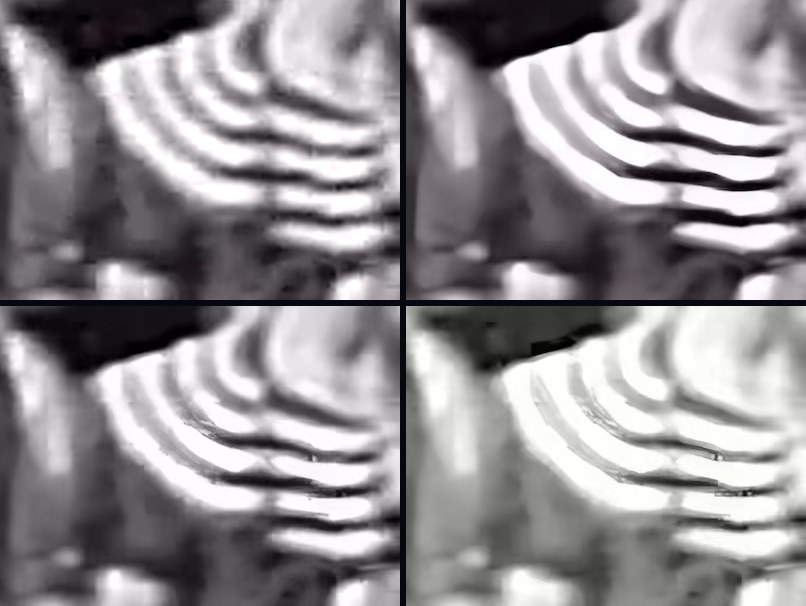
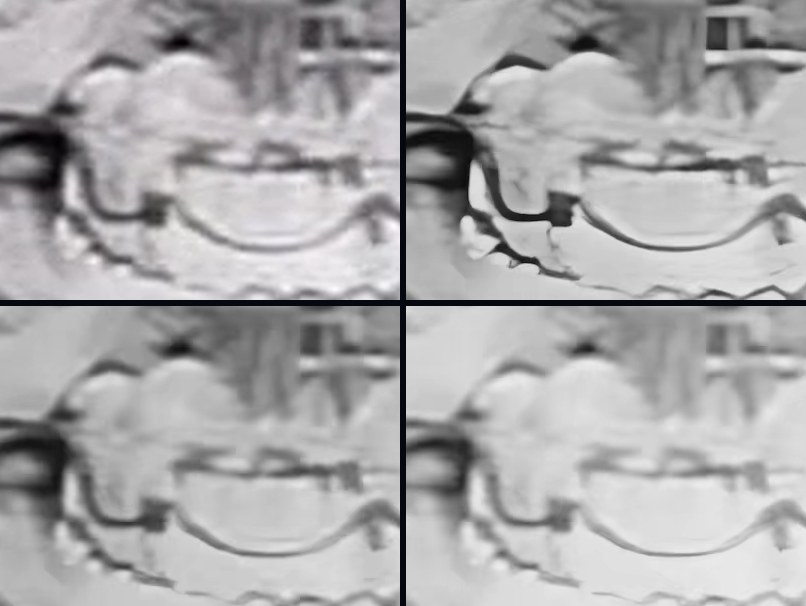
To my eye the numbers and the pictures agree on direction. Enhance gives the stripes in the boxing frame hard, clean edges. It also has a cost. In the birthday crop the lower left corner holds blotchy white shapes with firm outlines that the plain resize does not show. That is the model drawing, and it is the price of the steeper edges.
The 0.85 arm is calmer and softer, and on the boxing frame some edges step like stairs. Low-light cleanup looks lighter and flatter, which is the lift. If your footage is already well lit, that is not the preset to reach for.
What no enhancer can do
None of these settings recovers a detail the camera never recorded. A drawn edge is a guess that happens to look sharp. Focus is the clearest case: a frame that was never in focus has no sharp edge for a model to find, so it invents one. I wrote that up in why AI upscaling can’t fix focus. On clean footage a plain resize can land closer to the original than any model, which I measured in what the denoise setting does and when AI upscaling beats a plain resize.
Which setting for which footage
- Soft but clean footage. Enhance at the default. It is the sharper lean, and the cleaning is mild.
- Grainy or noisy footage. Move the Denoise slider to 0.5 or above, and expect softer edges. Film grain is a case of its own, and film grain vs digital noise covers it.
- Dark footage. Low-light cleanup lifts the shadows first and then cleans. That is the job it is built for.
- Cartoons and line art. The Anime / Cartoon preset uses its own model. I did not test it here.
- Badly damaged footage. Max quality is the most thorough restore Crisp has. It is a Pro feature, needs a one-time model pack of about 4.6 GB, and on video wants a Mac with 48 GB of memory or more. I did not measure it for this page.
Not sure which one? The Auto preset is the recommended default. Crisp describes it as detecting the source and choosing the model, scale and cleanup for you. If you want a step-by-step on a real clip, fixing blurry video on a Mac walks through one, and the free options on a Mac are compared in one place.
Questions people ask
Is a video enhancer the same as a video upscaler?
Not quite. An upscaler does the first job only: it makes the frame bigger. An enhancer is the broader word, and it can also clean noise and sharpen edges. There is no fixed definition, so check what a program says it does. In Crisp the same upscale also runs the cleaning and sharpening, and the Denoise slider decides how far it leans.
Does a video enhancer add detail that was not in the file?
For sharpening, yes, in the sense that matters. A sharper edge in an enhanced frame is the model's guess at what the edge looked like, drawn from what it learned on other footage. In my crops that guess looks right on hard stripes and wrong in a few soft areas, where it drew outlined shapes the original did not have. Treat it as a good guess, not a recovery.
Why did the Low-light preset make my video brighter?
Because that preset does two things. It lifts the shadows with a gamma adjustment before upscaling, and it cleans noise with the same stronger denoise as a denoise setting of 0.85. In my test the average brightness rose by about 33 levels on one clip and 37 on the other, out of 255. If you want the cleaning without the lift, keep the Enhance preset and raise the Denoise slider instead.
Is there a video enhancer for Mac that runs offline and is free to try?
Crisp runs on your Mac and does not upload your video. The free copy works and adds a small Made with Crisp mark to what it writes. Pro is $129 once, removes the mark, and adds Max quality and batch. There is a 30-day refund, no reason needed.