What AI video upscaling is, and what a video enhancer does
AI video upscaling raises a video's resolution by redrawing the fine detail a smaller frame can't hold, using a neural network trained on pairs of sharp and degraded images. A plain resize only spreads the existing pixels further. We measured the difference by halving real frames and upscaling them back. A plain resize kept the exact pixels and colours best but restored under two thirds of the fine detail. A heavier AI model restored up to 96% of it, by drawing detail that looks right rather than detail that was there.

The problem it solves
A 480p frame is 640×480, about 307,000 pixels. A 4K frame is about 8.3 million. Going from one to the other means producing 27 pixels for every 1 you started with, and no arithmetic recovers information that was thrown away when the video was shot or compressed. The only question is what goes in the empty space.
A traditional scaler fills it with a weighted average of the neighbouring pixels. Bicubic and Lanczos differ in the weighting, not the idea, and the result is soft, because a blur is the safest guess when you know nothing about what the picture contains.
What the model does differently
A super-resolution model is trained on enormous numbers of image pairs: a sharp frame and a degraded copy of it. It learns what a real brick edge, an eyelash or a line of text looks like at full resolution once it has been reduced to a few grey pixels. Shown your footage, it doesn't average. It produces the most likely sharp frame, given everything it has seen.
That is why the result has crisp edges and texture where a resize gives a smooth smear. It is also why it is a guess. Never treat upscaled footage as evidence of what something looked like: a model will happily draw a sharp, confident, wrong licence plate.
What we measured
To score a guess you need the right answer, so we made one. We took four frames: three from real aerial footage and a card of text and hard-edged colour. We halved each, then enlarged it back 2× four ways: a plain Lanczos resize, a fast 2× AI model, a heavier detail model, and that detail model's denoising version (what Crisp's Denoise 0.50 setting selects). Each result was scored against the original frame. Everything ran on unencoded frames, so no video compression favours either side.
| Frame | Method | Fine detail restored | SSIM | PSNR | Colour shift (ΔE) |
|---|---|---|---|---|---|
| Overhead architecture | Lanczos resize | 45% | 0.907 | 27.8 dB | 0.1 |
| Fast 2× model | 58% | 0.855 | 25.7 dB | 1.6 | |
| Detail model | 96% | 0.893 | 25.0 dB | 0.7 | |
| Detail model, denoise version (Denoise 0.50) | 86% | 0.901 | 26.4 dB | 0.9 | |
| Snowy town at dusk | Lanczos resize | 47% | 0.916 | 29.9 dB | 0.1 |
| Fast 2× model | 59% | 0.853 | 26.4 dB | 2.8 | |
| Detail model | 95% | 0.886 | 27.0 dB | 1.4 | |
| Detail model, denoise version (Denoise 0.50) | 87% | 0.888 | 28.1 dB | 0.9 | |
| Forest river | Lanczos resize | 31% | 0.824 | 24.6 dB | 0.1 |
| Fast 2× model | 36% | 0.694 | 22.6 dB | 1.2 | |
| Detail model | 47% | 0.789 | 23.6 dB | 2.4 | |
| Detail model, denoise version (Denoise 0.50) | 52% | 0.760 | 23.5 dB | 1.9 | |
| Text and graphics | Lanczos resize | 64% | 0.939 | 20.7 dB | 0.3 |
| Fast 2× model | 63% | 0.882 | 19.8 dB | 2.3 | |
| Detail model | 70% | 0.945 | 20.6 dB | 0.8 | |
| Detail model, denoise version (Denoise 0.50) | 67% | 0.947 | 20.8 dB | 0.8 |
How to read it. "Fine detail restored" compares the edge energy of the result with the original's. SSIM (structural similarity, 1.0 is identical) and PSNR (higher is closer) measure how exactly the pixels match. Colour shift is blurred ΔE76, where about 2.3 is the smallest difference people see.
Why the numbers disagree
The plain resize has the highest PSNR on three of the four frames and the highest SSIM on three, and it barely touches colour. It is the most faithful because it invents nothing. It is also the softest, restoring 31% to 64% of the fine detail.
The detail model restored far more, 95% to 96% on two of the aerial scenes, and beat the resize on SSIM for the text card. It scores lower on PSNR anyway, because PSNR punishes detail that is plausible but not exactly where the original had it. The dotted ring drawn solid in the figure is that trade, visible.
The fast model is the honest disappointment: it restored only a little more detail than the resize, and on the text card slightly less. Speed is what it buys. On a Mac Studio it took roughly half the time per 4K frame that the detail model did.
Scope, plainly: four frames, 2× only, one machine. These compare methods on the same frames. They aren't constants for your footage.
What it genuinely fixes
| Problem | Fixable? | Why |
|---|---|---|
| Low resolution | Yes | The core case. Detail is missing but structure survives. |
| Compression damage | Mostly | Blocking and banding have consistent shapes a model can learn. |
| Sensor noise and grain | With care | Denoise first, or the model sharpens the noise into texture. |
| Out-of-focus or motion blur | No | The information is gone from every frame. See why AI upscaling can't fix focus. |
Frames are not photos
Upscaling one photo is a solved problem. Upscaling 1,500 frames in a row is not, because each frame is processed on its own and the model's guesses differ slightly from one to the next. A texture drawn one way on frame 200 and slightly differently on frame 201 shimmers: a crawling quality in flat areas, obvious in motion and invisible in a still. So judge any upscaler playing at full size, never on a paused frame.
What Crisp does
Crisp ships both kinds of model and picks one per job. Enhance at 2× uses the fast 2× model, and at 4× it uses the detail model. "Enhance to 4K" on a 1080p clip is a 2× job, so it uses the fast model too. Asking for stronger noise reduction switches to a denoising version of the detail model. From Crisp 1.0.1359 (23 September 2026) the fast model's output takes its colour from your original, because on its own it shifted colour visibly; the colour shifts in the table above were measured with that fix in place. Everything runs on your Mac.
Getting the detail model at 2× today
You can, with one setting, though not from the app's editor, which has no Denoise control. The command-line tool takes it: crisp upscale photo.jpg --preset enhance --scale 2 --denoise 0.5, run from the crisp program inside Crisp.app. In the app, asking Crisp to remove the noise sets 0.6, which also gets you the denoising model at 2× but adds the noise pre-pass described below. At exactly Denoise 0.50 a 2× job switches from the fast model to the denoising version of the detail model, with no extra noise filter; above 0.50 Crisp also adds a noise pre-pass, which smooths detail away. In the table that setting restored 86% to 87% of the fine detail on the two aerial scenes, against 58% to 59% for the default, with better SSIM and PSNR than the default on all four frames. It costs time: about 1.2 seconds a 4K frame against about 0.8 on a Mac Studio, roughly half as long again.
What to do with a bad clip
- Work out which problem you have. Pause and zoom in. Soft everywhere, with no hard edges anywhere, is focus, which can't be fixed. Square blocks in dark or fast-moving areas are compression, which can.
- Deal with noise as part of the upscale. Upscaling noise teaches the model to treat grain as texture and amplify it.
- Compare against a plain resize. If a Lanczos resize looks acceptable for where the video is going, it is free and the most faithful. See when AI upscaling beats a plain resize.
- Judge in motion, at full size. Shimmer only shows when it plays.
AI upscaling questions
What is AI video upscaling?
Raising a video's resolution with a neural network that redraws fine detail, instead of only spreading the existing pixels further as a normal resize does. The network is trained on pairs of sharp and degraded images, so it produces the most likely sharp version of each frame.
Is AI upscaling better than a normal resize?
It restores more detail and is less exact. In our test a heavier AI model restored up to 96% of the original's fine detail, against at most 64% for a Lanczos resize, but the resize matched the original's pixels and colours more closely. For a sharp source going to a larger screen, a resize is often enough.
Does AI upscaling recover the real detail?
No. It draws detail that is plausible for what the frame shows, not detail that was recorded. In our test it redrew a dotted ring as a solid one. Never use upscaled footage as evidence of what something looked like.
Can AI upscaling fix a blurry video?
Not if the blur is from focus or motion. That information is gone from every frame, and the model sharpens the blur rather than removing it. Low resolution and compression damage are what it fixes.
What a “video enhancer” actually does
“Video enhancer” has no fixed meaning; apps use it for anything that improves a clip. It comes down to three separate jobs. Bigger: more pixels (a plain resize does this and adds no information). Cleaner: less noise and fewer compression blocks, so flat areas go quiet. Sharper: steeper edges, the job where a model draws what it expects an edge to look like because the file does not hold the real one. They pull against each other: cleaning averages away fine variation and sharpening creates it, so no single setting does all three at full strength. We measured which way each Crisp setting leans.
What we ran. Crisp 1.0.1455 on two clips already on this site: an archival boxing clip (1280 by 720, 60 frames, heavy film grain) and the 1950s birthday newsreel scan (960 by 720, 60 frames), each through four arms written at the same size. The control was a plain resize (the bundled ffmpeg’s Lanczos scaler). Enhance is the Enhance to 4K preset at its default denoise of 0.40, which runs the RealESRGAN_General_x4_v3 model and then a colour pass that puts the source’s colour back; below a denoise of 0.5 there is no separate cleaning pass. Enhance with denoise 0.85 raises Denoise to 0.85 (asking Crisp to remove the noise sets 0.6); above 0.5 Crisp switches to the WDN model and adds a temporal and spatial denoise pass before the upscale. Low-light cleanup is the same model and denoise as the 0.85 arm plus a shadow and gamma lift before upscaling (we found the lift in the code after the first numbers came in, which is why that arm was added). The three Crisp arms ran through the engine’s own upscale function, the code the shipped app runs.
How we measured. The method was written down before rendering. For every arm we took every sixth frame (ten frames) and looked at brightness only, with two numbers per frame. Noise: split the frame into 48 by 48 blocks, take each block’s spread of brightness after removing its average, keep the quietest quarter of blocks (the flat areas) and report their median; lower is cleaner. Edge strength: the average Sobel gradient of the strongest 1% of pixels, in brightness levels per pixel; higher is sharper. The plain resize is the control, and the instrument moved when something really sharpened.
| Clip and setting | Noise (lower is cleaner) | Edge strength (higher is sharper) | Average brightness (of 255) |
|---|---|---|---|
| Boxing, plain resize | 5.71 | 16.01 | 113.1 |
| Boxing, Enhance | 5.14 | 25.17 | 113.0 |
| Boxing, Enhance with denoise 0.85 | 4.73 | 17.97 | 112.7 |
| Boxing, Low-light cleanup | 4.12 | 16.97 | 149.9 |
| Birthday, plain resize | 3.98 | 16.71 | 104.8 |
| Birthday, Enhance | 1.73 | 27.02 | 106.0 |
| Birthday, Enhance with denoise 0.85 | 1.48 | 16.98 | 106.2 |
| Birthday, Low-light cleanup | 1.86 | 16.72 | 137.3 |
Against the plain resize on the same clip, Enhance made edges 57% (boxing) and 62% (birthday) steeper and cleaned flat areas by 10% and 57%. Enhance with denoise 0.85 cleaned more, 17% and 63%, but its edges were only 12% and 2% steeper, so the sharpening mostly went away. Low-light cleanup cleaned by 28% and 53% and left edges where a plain resize puts them (6% and 0%), and lifted the average brightness by about 37 and 33 levels. Two limits: one clip’s number says nothing about your footage, and neither number says which version looks better, because a model that draws texture raises both. In the crops below, Enhance gave the stripes in the boxing frame hard, clean edges, at a cost: the birthday crop gained blotchy white shapes with firm outlines that the plain resize does not show, which is the model drawing. The 0.85 arm was calmer and softer, with some edges stepping like stairs on the boxing frame. Low-light cleanup looked lighter and flatter, which is the lift, so it is not the preset for footage that is already well lit.
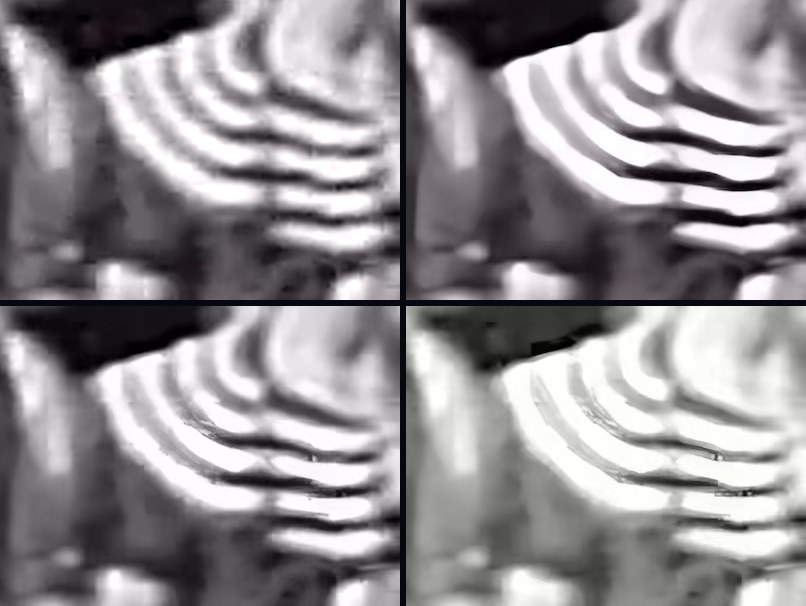
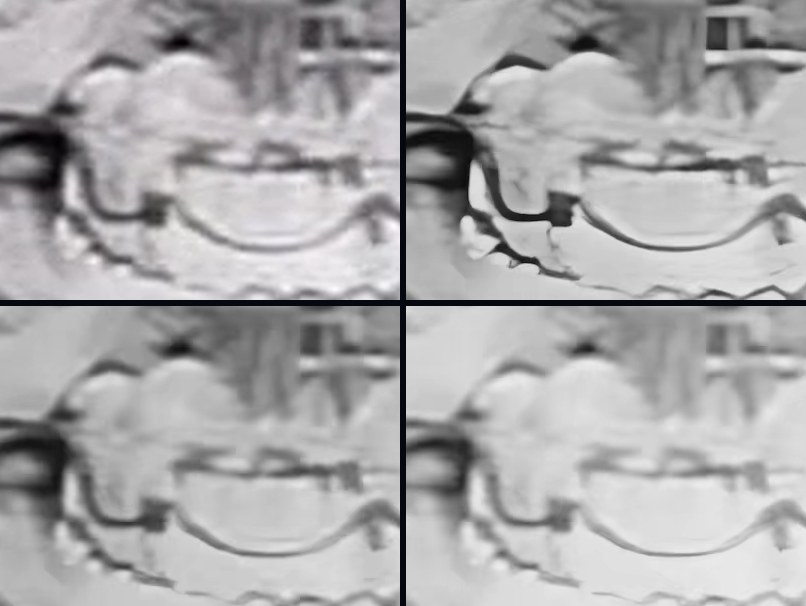
Which setting for which footage. Soft but clean footage: Enhance at the default, the sharper lean with mild cleaning. Grainy or noisy footage: ask Crisp to remove the noise (Denoise 0.6, above the 0.5 mark) and expect softer edges; film grain is its own case (see film grain vs digital noise). Dark footage: Low-light cleanup lifts the shadows first and then cleans. Cartoons and line art: the Anime / Cartoon preset uses its own model, which we did not test. Badly damaged footage: Max quality is Crisp’s most thorough restore; it is a Pro feature, needs a one-time model pack of about 4.6 GB and, on video, wants a Mac with 48 GB of memory or more; we did not measure it here. Not sure: the Auto preset is the recommended default. What no enhancer can do: none of these settings recovers a detail the camera never recorded. A drawn edge is a guess that happens to look sharp, and a frame that was never in focus has no sharp edge for a model to find (why AI upscaling cannot fix focus). On clean footage a plain resize can land closer to the original than any model (when AI upscaling beats a plain resize).